Oddle Reserve Host App (B2B)

Timeline View

Platform
Tablet/Desktop Responsive Web App
Timeline
Feb - April 2023 (3 months)
Status
Development on hold
Team
1x Designer
1x Product Manager
3x Usability Testers
10x Developers
Role
- Sole designer for Oddle Reserve Host App since its MVP in 2021
- Collaborated with product managers and engineers
- Created and maintained the design library for Host App
Company Background
Oddle is a Singapore based F&B technology company that operates also in Malaysia, Taiwan and Hong Kong. With a focus on supporting the growth of over 5000 restaurants in Asia, Oddle offers a range of products and services such as online shop, reservation system and restaurant discovery platform.
Product Background
Oddle Reserve is a free reservation management solution introduced in Q3 2021 to establish the company as a comprehensive online-to-offline (O2O) platform. It serves a pivotal role in the company's restaurant acquisition strategy of getting merchants onboard to the ecosystem of Oddle products. However, due to time and resource constraints, Oddle Reserve has poor product market fit facing fundamental usability problems and feature disparity.
Problem
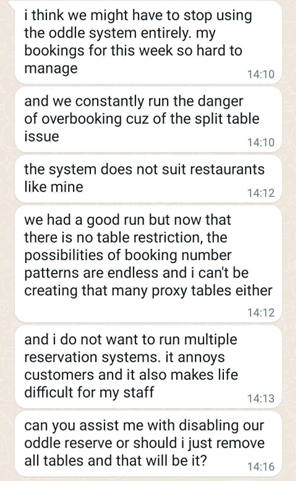
We often receive feedbacks from merchants that Oddle Reserve's Host App is inefficient for operations and inflexible in taking reservation resulting in suboptimal restaurant capacity. This inefficency has resulted in the loss of many potential customers for restaurants, causing them to churn from Oddle Reserve.
Our Users
Restaurant manager makes decisions regarding reservation acceptance, allocation of resources, and operational adjustments based on factors like special events or peak hours. A manager needs a system that is flexible and is able to support reservation acceptance set ups in advance.
Restaurant staff uses the system for daily reservation management tasks such as booking and managing reservation details. Staffs need an efficient and easy to use system to help real life operations run smoothly and reduce manual labour. Ease of use is crucial as many restaurant staffs are not tech savy.
Painpoints from research
Based on previous merchant interviews and feedback on the existing reservation management flows, we identified some of the key, overlapping pain points faced by merchants:
Painpoint 1:
Difficulty in visualising restaurant capacity and table availability
When taking reservations, staffs cannot promptly and visually assess table availability for a specific date and time from a list of reservations. Instead, they are required to input details such as number of guests, date and time into the add reservation form before checking if there is an available table. This is an inefficient and time-consuming process for staffs to determine restaurant's capacity, particularly for popular restaurants with often limited table availability.
Painpoint 2:
Inefficient table assignment process
Table reassignment is one of the most frequently performed actions during restaurant operation. However, users are required to go through multiple steps to change a reservation's table number. This slows down staffs' operational flow and leads to frustration.
Feedback by a churned merchant
Painpoint 3:
Unable to assign reservation to multiple tables
Staffs often need to combine tables to accommodate different group sizes in order to maximise capacity. However, the current system is not capable of handling such scenarios. This prevents restaurants from optimising and maximising their seating capacity. This causes the system to reject online reservations when it could have been accepted and costs restaurants many potential customers. When reservations are made through the phone, staffs have to manually create multiple reservations for each table they have to combine with, which is highly inefficient.
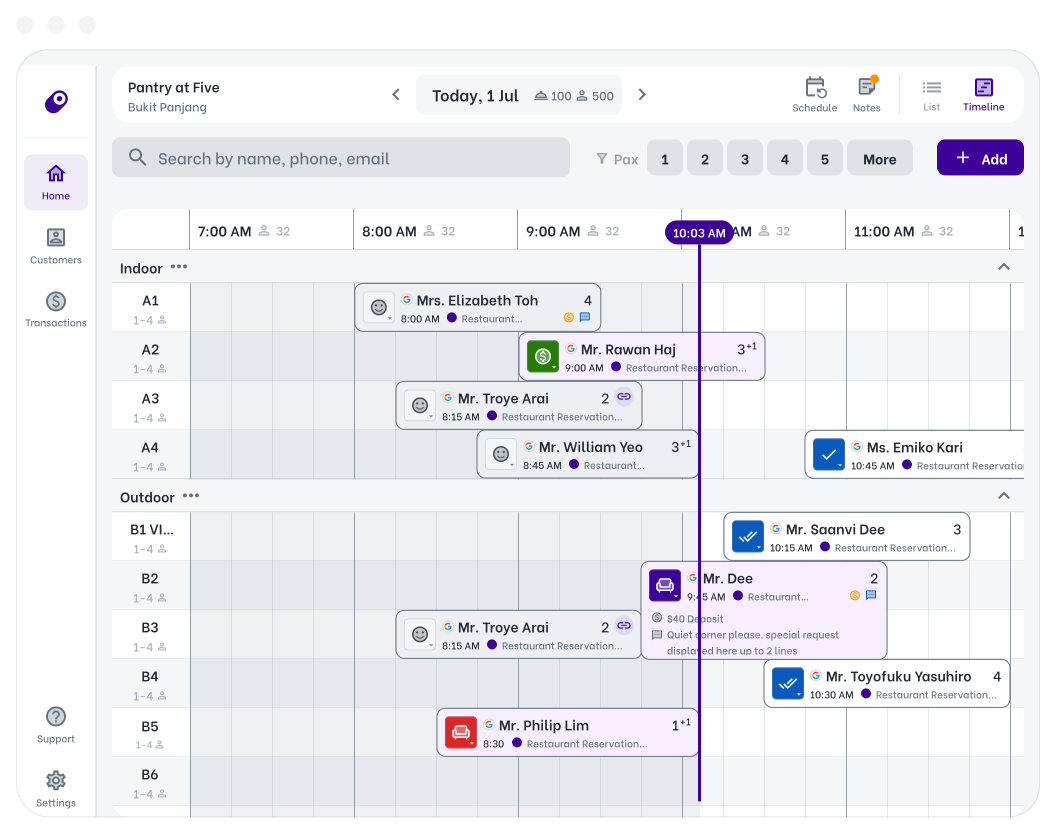
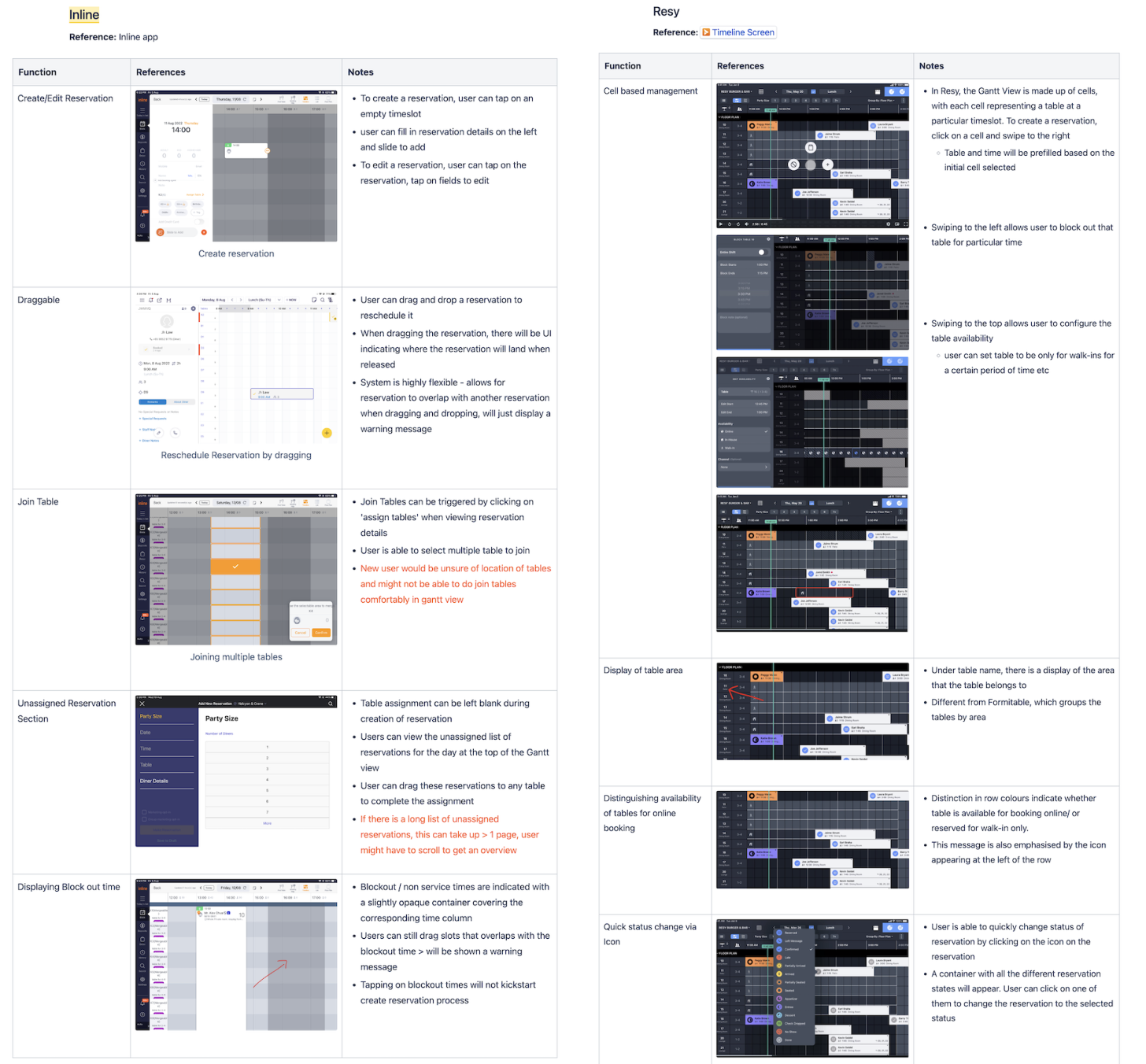
We studied reservation management products such as Inline and Resy, to understand how they help restaurants visualise restaurant capacity. The PMs found that the “Timeline view”, a time-table no. view for all reservations in a day, would be the most useful in helping restaurants visualise and maximise their capacity as well as improve efficiency for table assignment. It is also a feature that has been frequently requested by our merchants.
Painpoint 1:
Difficulty in visualising restaurant capacity and table availability
Clearer visualisation of restaurant capacity and table availability
- Staffs are able to quickly spot available tables when the restaurant is packed through the timeline view.
- Restaurant managers are better able to prepare for peak periods and make high level decisions with a clearer visualisation of restaurant capacity.
- Operational efficiency is improved as the time and table fields are automatically filled into the add reservation form if a cell is selected from the timeline view.
Painpoint 2:
Inefficient table assignment process
Assign tables efficiently to optimise capacity in the timeline view
- Reservations can be shifted on the timeline view to change the time or table number quickly.
💥Impact: 1 drag on the timeline view instead of 5 clicks via edit reservation details flow
- Staffs are now able to assign a reservation to multiple tables quickly in the timeline view without having to go through the tedious add/edit form flow.
💥Impact: assigning to multiple tables on timeline view takes 3 clicks instead of 5 clicks via edit reservation details flow
Painpoint 3:
Unable to assign reservation to multiple tables
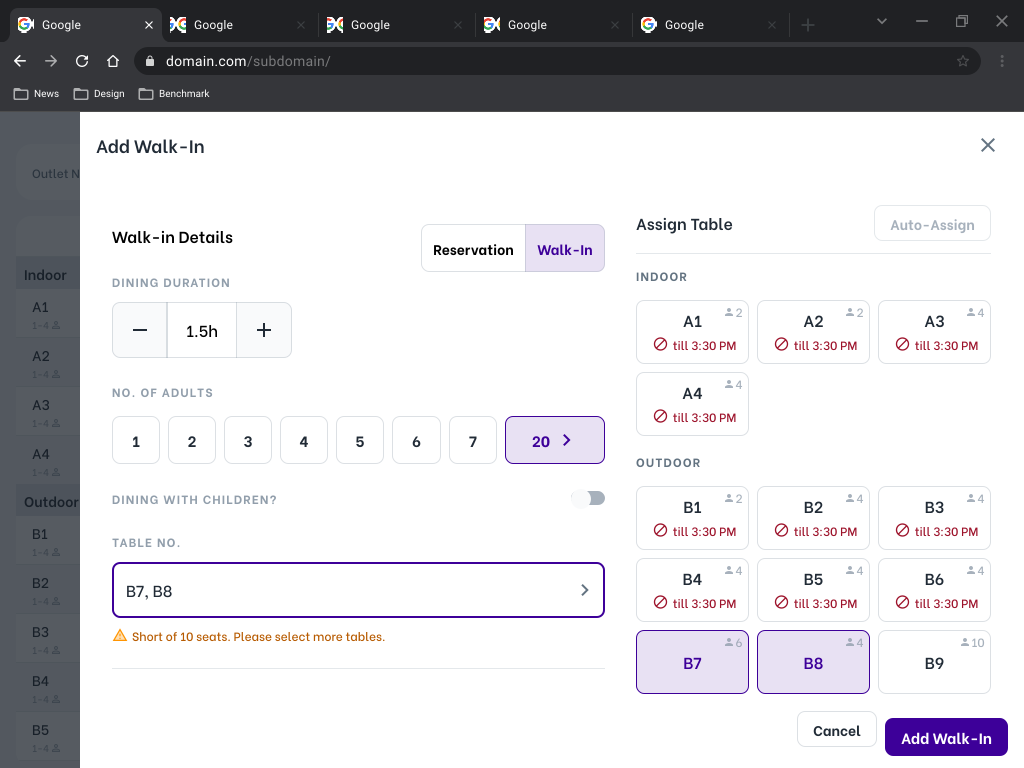
Assign multiple tables in the add reservation form
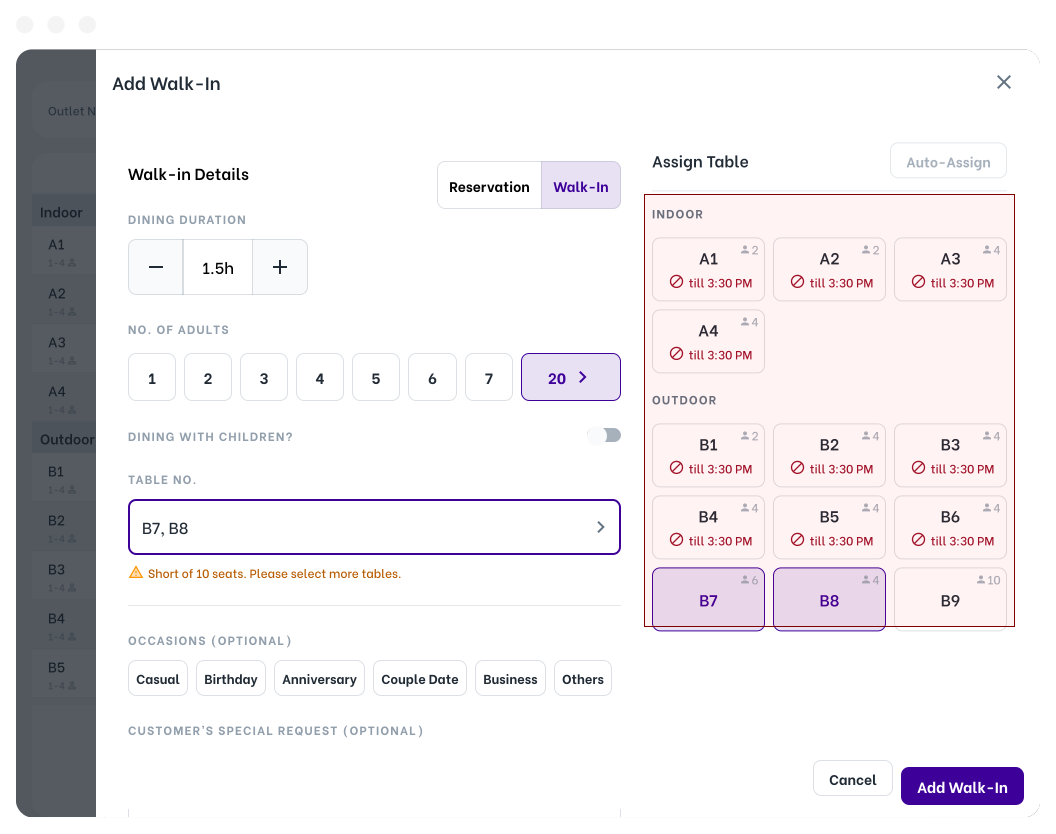
- Within the current add/edit form, staffs are now able to multi-select tables from the table no. field.
- System is also able to provide feedback on the tables chosen based on input reservation pax size to remind staffs e.g short of 10 seats, select more tables
Bonus feature
Squeeze walk-ins easily to maximise restaurant capacity
Staffs can adjust the dining duration of reservations and walk-ins easily on timeline view. This allows managers/staffs to squeeze walk-ins with any dining duration flexibly e.g 1h instead of a usual 2h dining duration.
Unfortunately after I handed off my designs, the company went through a major restructuring and all development for Oddle Reserve was came to a halt. These are what our merchants say about the feature during our usability test sessions:
"Looking forward to timeline view. It will greatly reduce the work that staffs need to do."
- Restaurant Manager B
"With a bit of training, the timeline view will be useful and easy."
- Restaurant Manager A
Low-Fi to Mid-Fi
->
Usability Testing
->
Insights & Fixes
->
High-Fi Designs
Low-Fi Wireframes to Mid-Fi Designs
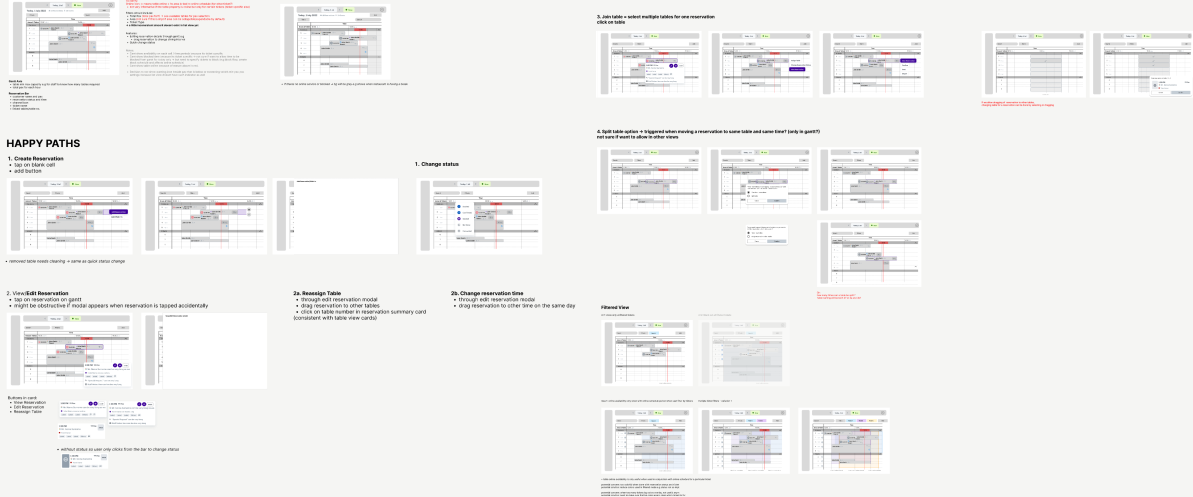
I started with low-fidelity wireframes for the main happy flows and identified the must-haves elements in the timeline view. Some low impact features were also deprioritised following the low-fidelity wireframes such as split tables and filtering reservations by ticket.
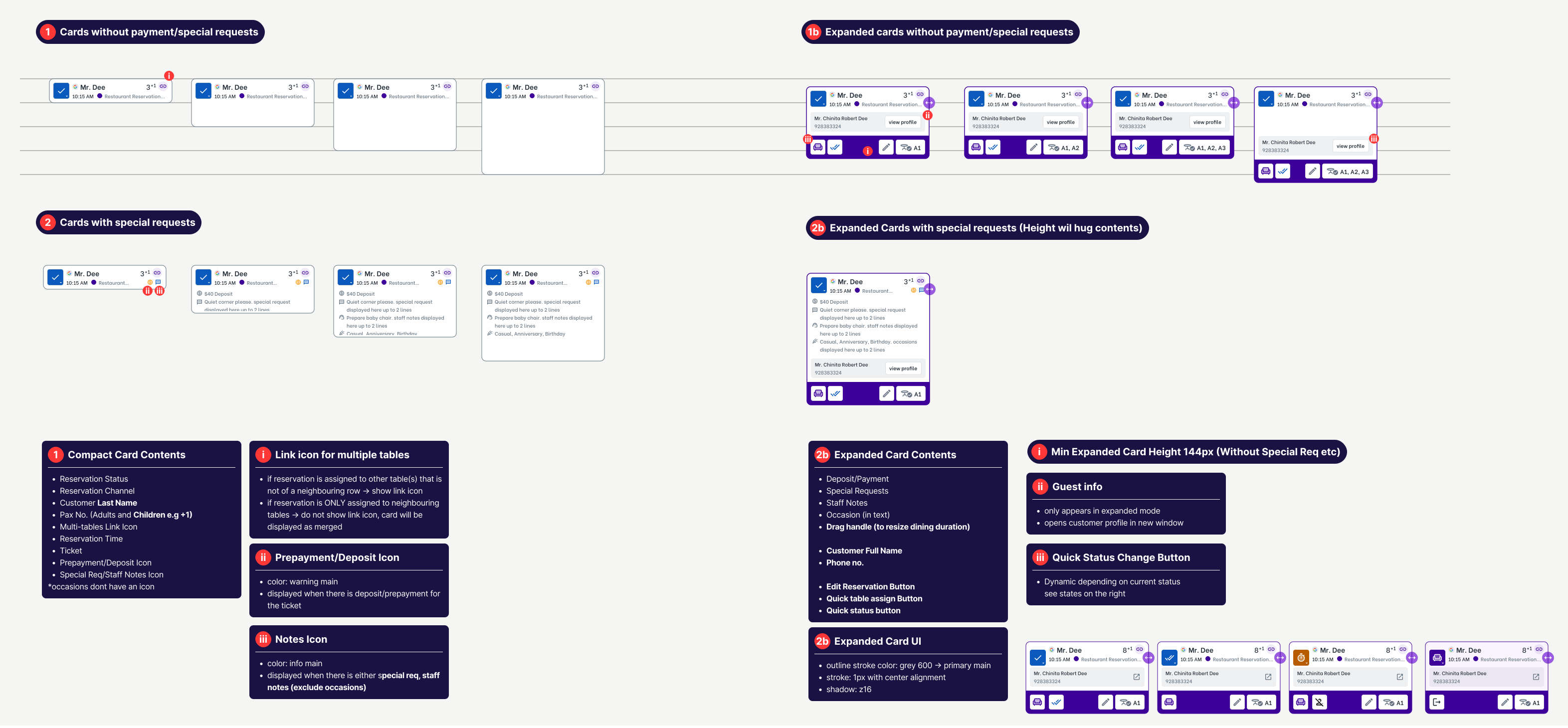
I proceeded to ideate and iterate additional flows, states and interactions in detail with mid fi for better visualisation in prototype such as:
- add/edit reservation/walk-ins on timeline view
- filtering by search and pax
- changing reservation status
- seat reservation flow
- single/multiple table assignment
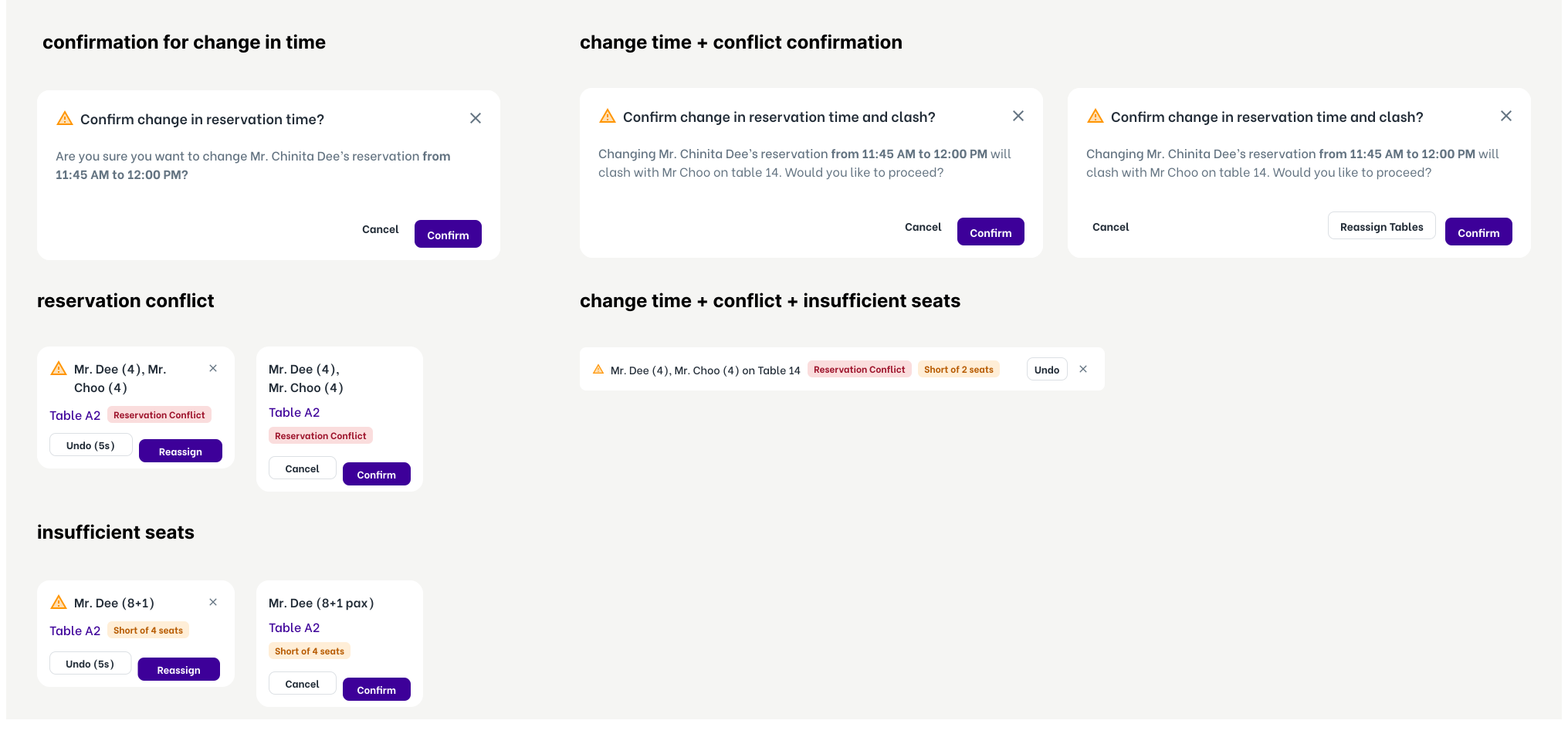
- resolving overlapping reservations
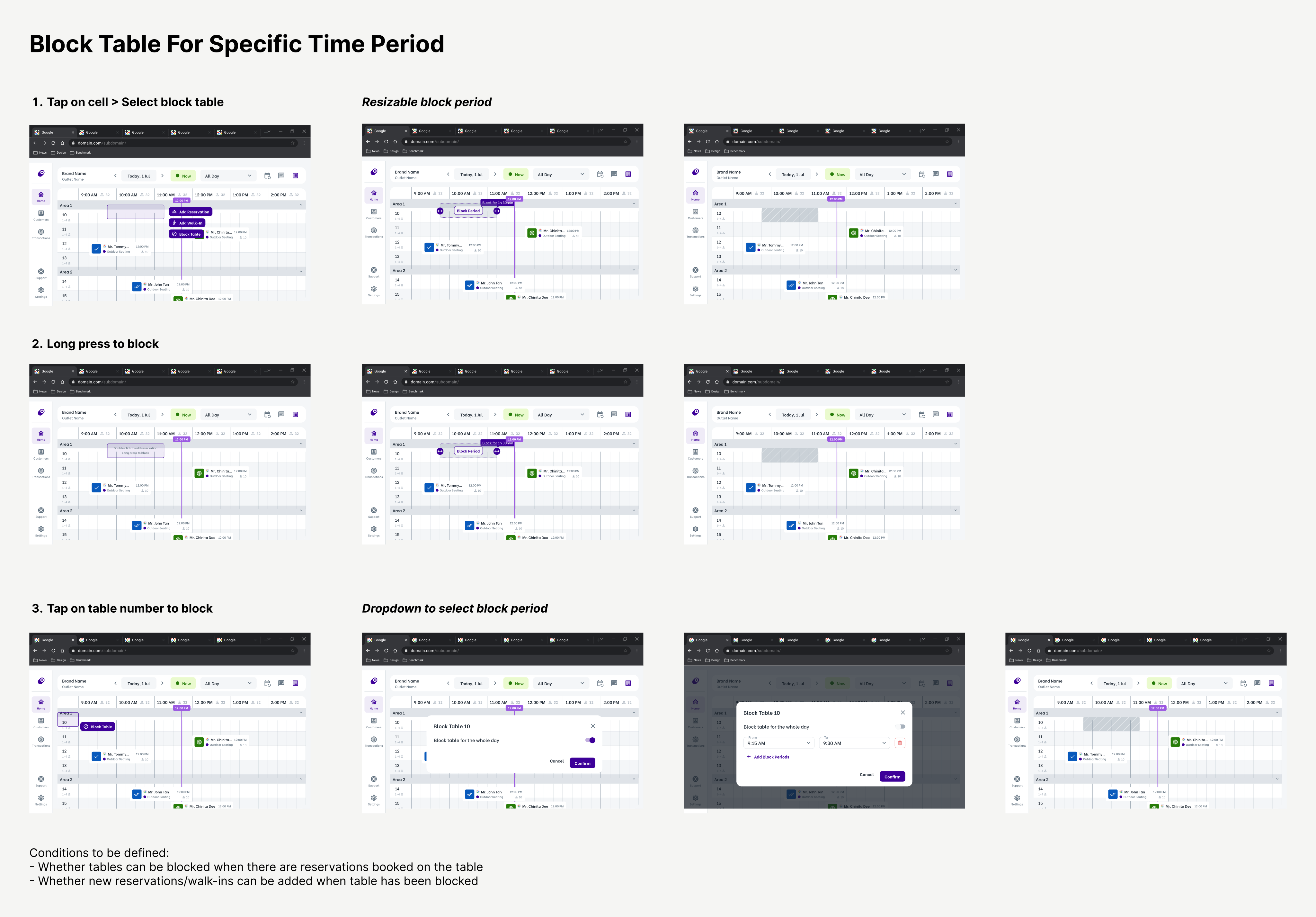
- blocking single/multiple table for whole day/specific time periods
- blocking tables in entire area
Usability Testing
To gain insights on the user experience and learning curve of flows and interactions, i decided to conduct a usability test with prototypes for basic reservation tasks on gantt view. For the usability test, we shortlisted 8 merchants to conduct usability testing.
With the help of the sales manager, we shortlisted 8 restaurants with:
- high amount of reservations and are often booked by large groups of customers
- merchants who requested for the gantt view feature
- merchants who requested for better optimisation of restaurant capacity
- 4 restaurants with experience of using the gantt view
- 4 restaurants with no experience of using the gantt view
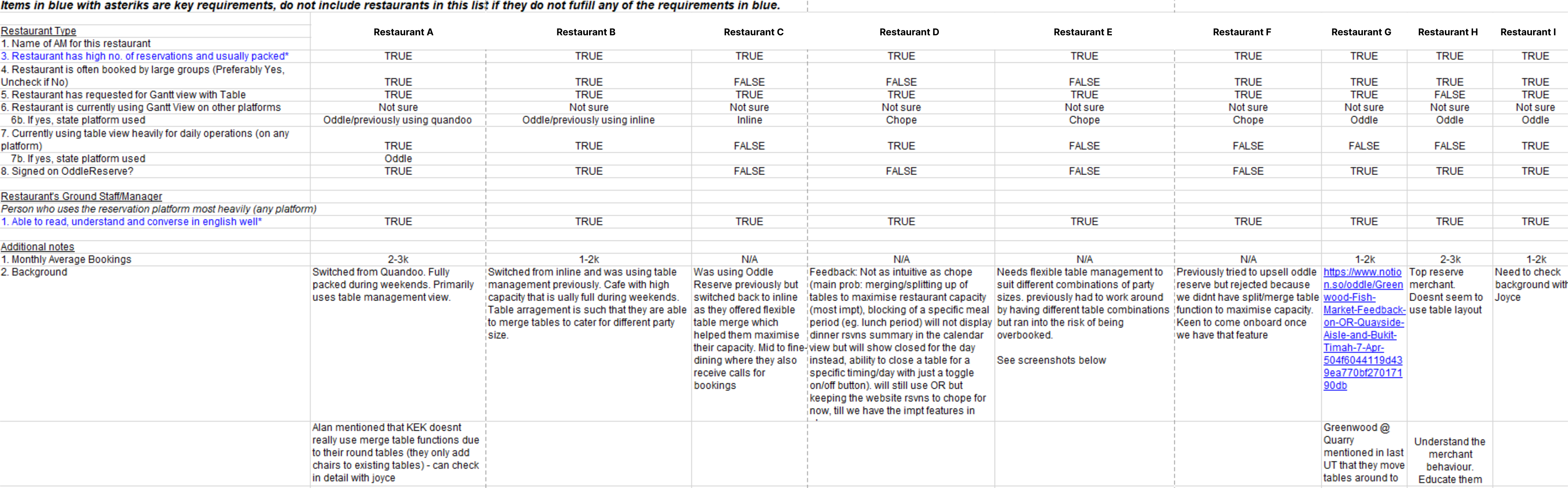
Together with the PMs, we gave 7 tasks on basic reservation flows such as add reservation, changing reservation’s time, table, status and dining duration on the gantt view as well as blocking of area and table. The overall task completion rate was 97% with some assistance.

7 scenario tasks conducted during the testing
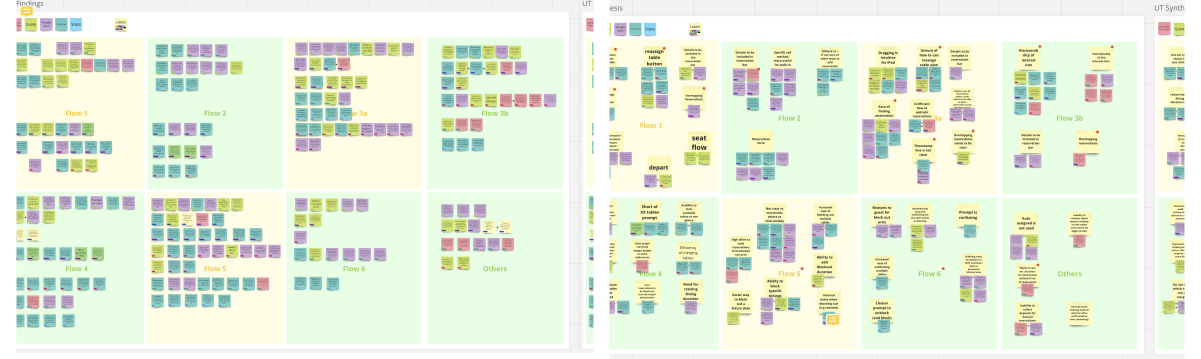
We listed all user painpoints and observations found from the usability test (left) and grouped similar pain points before prioritising items to be improved in the final design (right).
Insights from Usability Test & Design Fixes
Due to time constraints, we only focused on tackling the painpoints that brings the highest impact with least effort. The scoped painpoints are as follow:
1. Discoverability of functions
Across multiple flows, merchants made comments that they are unsure of where to click, not realizing the icons are clickable, not realizing certain actions can be performed etc.
5/6
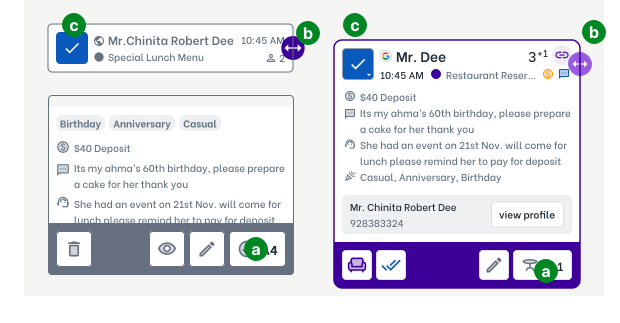
users did not understand the icon of the table reassignment button
a
Changed "checked" icon to "table checked" icon
5/6
users did not see the drag handle for resizing of dining interval
b
Changed shade of purple to a lighter purple for greater contrast
3/6
users did not think that the status can be clicked
c
Added dropdown arrow within status icon button
2/6
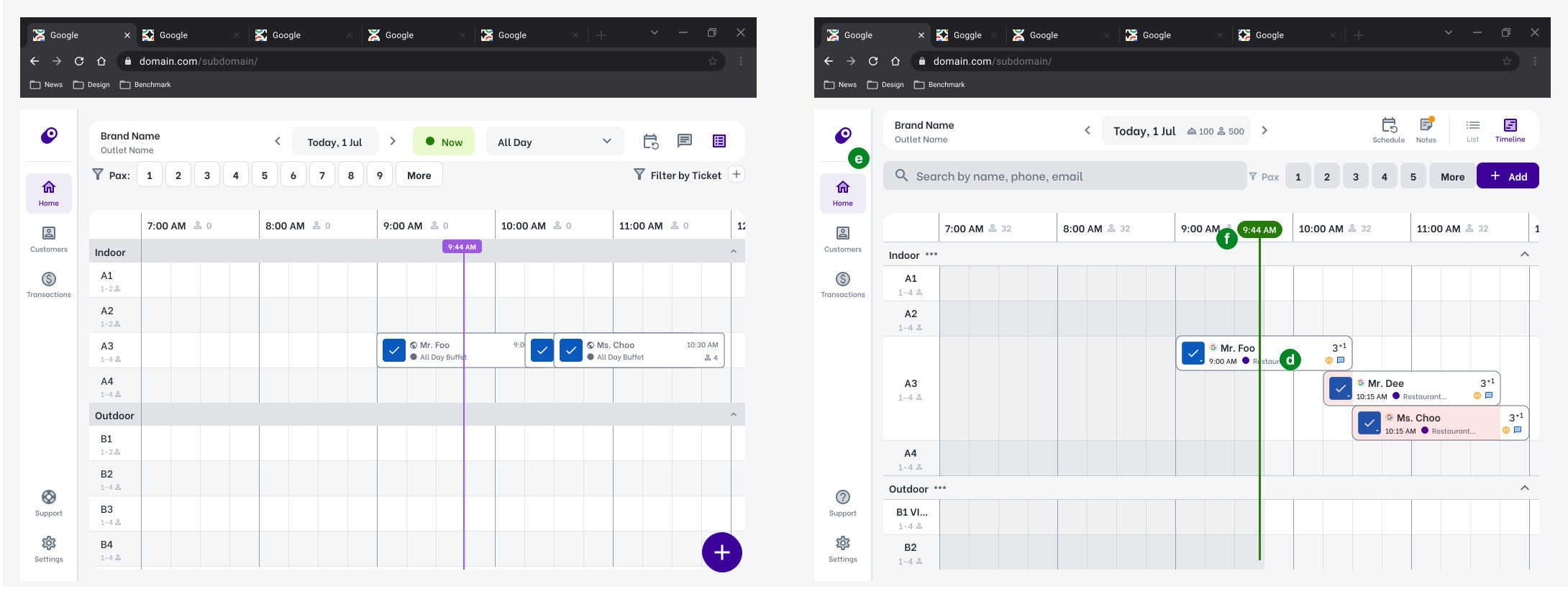
users felt like overlapping reservation was not clear
d
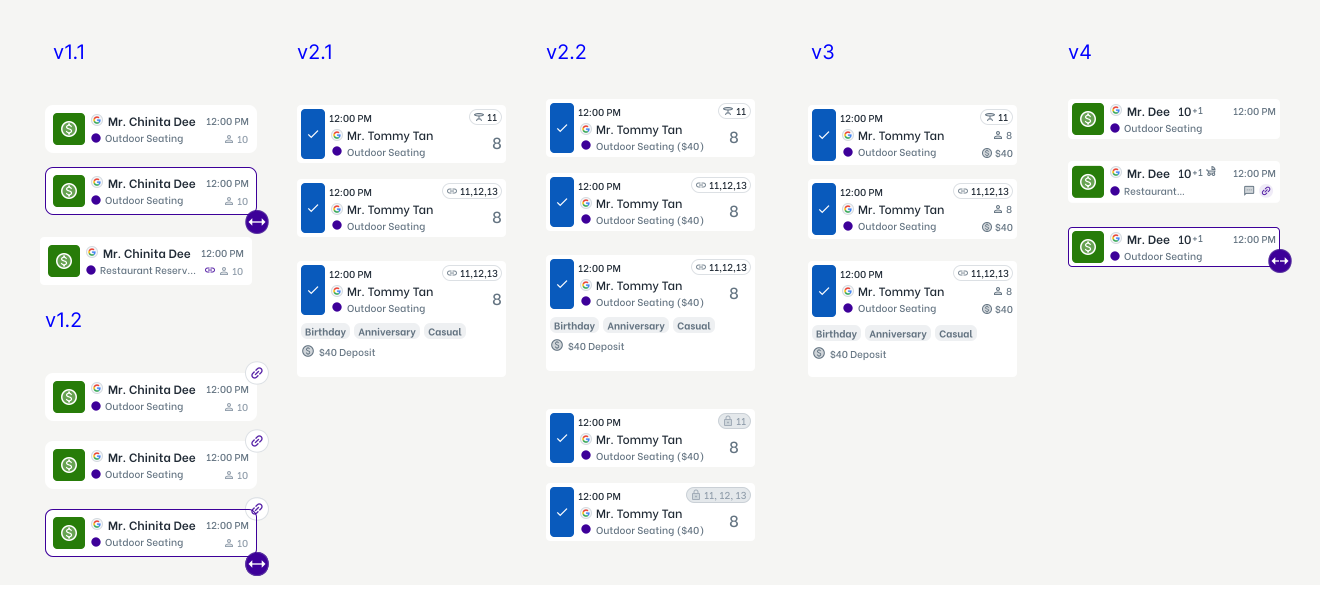
Increased table row height to show multiple reservations on the same table. Periods of overlapping is highlighted in red. This representation can also helps staff to better visualise when tables are split.
4/6
users had difficulty finding a specific reservation when the gantt view is packed.
e
Added search bar jump to and highlight specific reservation.
3. Accessibility
1/6
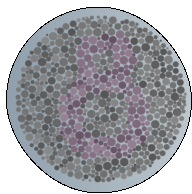
user did not notice the time ruler and struggled to identify the current time in multiple flows. We also realised that there might be a possibility that the user might have color deficiency, causing him to perceive purple as grey.
f
Changed color of the time ruler from purple to green and increased the thickness of the time ruler.
Color deficiency test with purple on grey
4. Naming of Feature
4/6
merchants were unfamiliar with the term “Gantt”
g
We renamed “Gantt” to “Timeline”.
“I appreciate this kind of session because I get to understand what you guys are doing… that you guys are working hard to make the product better for us.
- Restaurant Manager B
High-Fi Designs
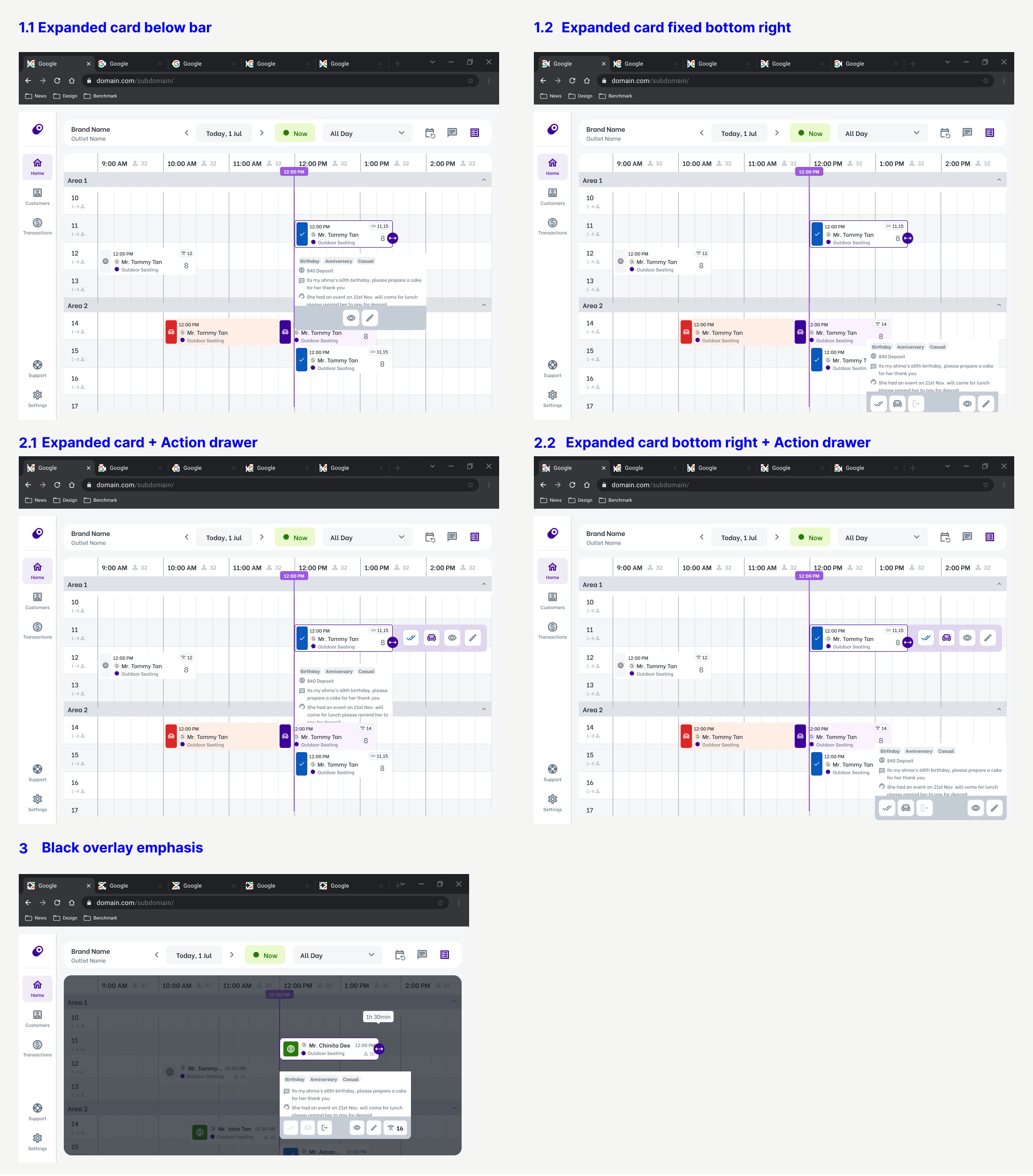
I continued to refine and iterate on the designs and flows based on the new understanding of user behaviour from usability testing.
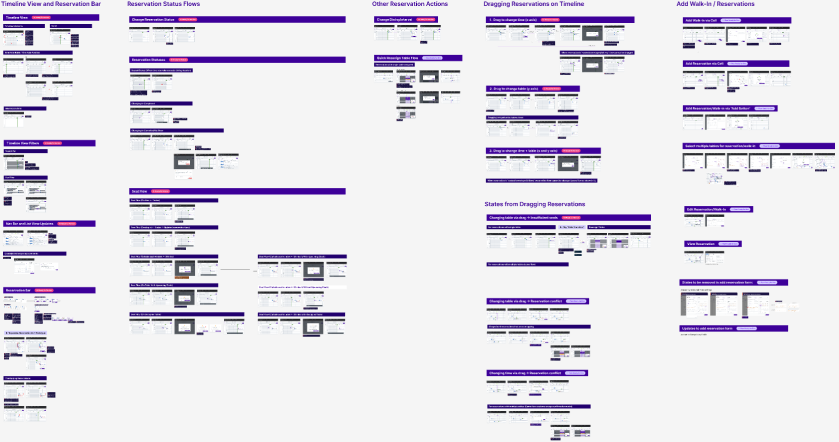
Overview of all high-fidelity flows
Feature Limitations
1. Timeline view is not as useful as floorplan view in assigning reservation to multiple tables.
Even though the timeline view reduces the number of clicks required for table assignment compared to the existing flow, it is still not the most efficient method for multiple table assignment. Tables displayed in the timeline view and add reservation form follows the sequence in which the tables were ordered in the settings page.
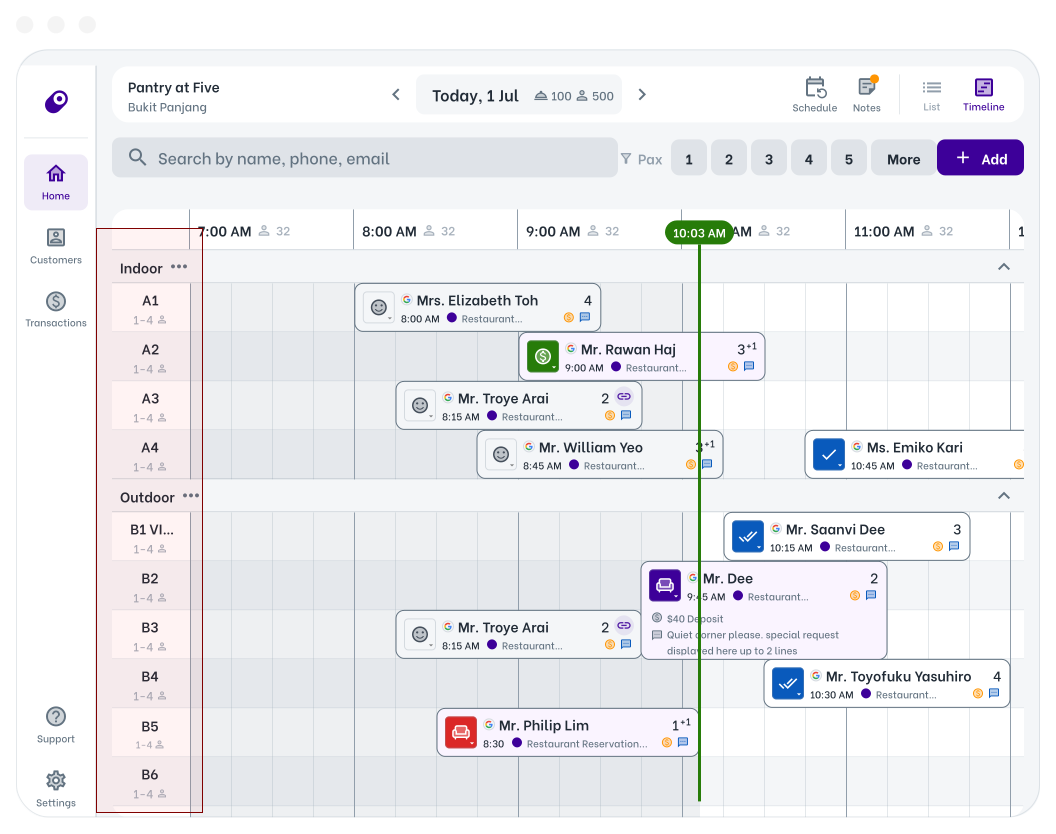
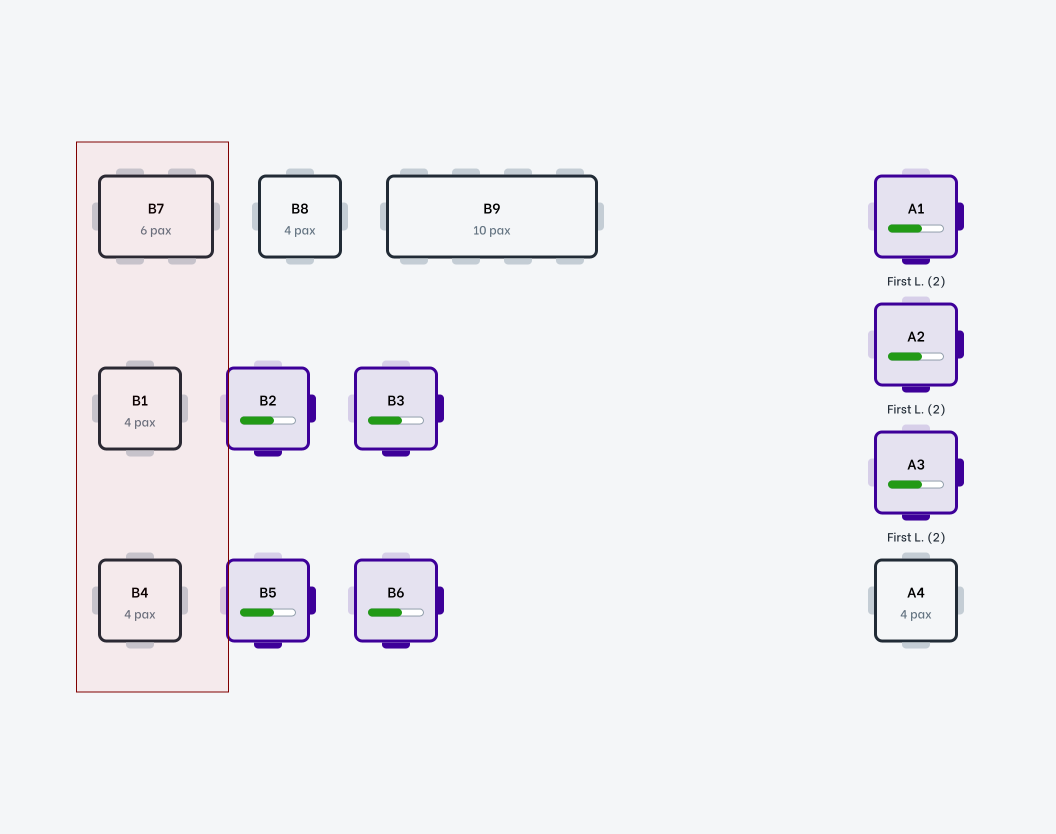
However, there is a possibility of a real life scenario where tables B7, B1 and B4 can be merged vertically to accommodate a group of 10 (left image below). In this case, staff would need to navigate through rows of table numbers in the timeline view (right image below) to find and assign reservation to tables B7, B1 and B4. Such process requires a heavier cognitive load and poses a challenge for new staffs who are unfamiliar with restaurant table numbers and possible table combinations. In contrast, having a floorplan view that mirrors real-life layout, would be more useful than the timeline view in allowing staffs to assign table combinations efficiently.
2. Restaurant capacity is unable to be maximised as system is still unable to assign reservations made online to multiple tables automatically.
Even though reservations can be assigned to multiple tables via the timeline view and add reservation form within the host app, the system is still unable to automatically assign optimised set of tables for reservations booked online. This requires additional feature to allow all merchants to input their preferred table combinations into the system. Without the ability to accept and assign online reservations to multiple tables, restaurants are still unable to maximise their capacity.
3. Table number lock
When make a reservation, some customers may have specific table requests. In such scenario, such information should be available to the staffs to prevent accidental table reassignment. E.g visual indicator on reservation card / a table field lock in reservation form.
Challenges and Learnings
1. Lack of designers involvement in problem discovery phase
Due to absence of prior UX designers in the company, it had been a norm for product managers to hand designers fleshed out solutions to turn into visually appealing pixels. After being part of such a process, I realised that the product seem to constantly suffer from user experience parity where soutions are not impactful in addressing user needs. That is when I realise the importance of designing based on UX data evidences and designers needs to be involved in problem definition, discovery and solutioning for the team to be align on impactful designs.

However, due to time constraints, there was no conversations with our users during the early research for this feature. I also faced challenges in creating flows due to the lack of use cases during the early design phase. To address this, I initiated conversations with the product manager and requested to be included in early discovery processes such as calls and documents related to user insights.
2. Lack of clear definition and alignment of how success looks like
One area that we could have done was to have conversation as a team on ways to validate our solution with our users. This way, we can define and track metrics of a product early on and measure the impact of the feature.
3. Ineffective alignment on expected delivery timings
As there was no clear deadline for the project by the PM and i had a vacation planned, I proposed a feasible timeline for the initial scope and ran through with the PM. However, miscommunication still occurred and we were misaligned by almost a month. Since there was no leeway for further changes to the project timeline, other PMs and designers had to jump in to assist with conducting and analysis of a few usability test sessions while I was away. A project timeline that was clearer and had been negotiated more effectively could have reduced stress, uncertainty, and the necessity to rush through the project. To prevent such event from happening in the future, I learnt the importance of over-communicating as well as having more stakeholders to sit in such scenarios/have the final meeting alignment documented officially to allow more stakeholders to be in loop.

I also learnt that not all developments have to start only when the high-fidelity design is completed. In the case of this feature, the engineers were able to start with low-fidelity designs if the flows are finalised. This helped to shorten the building cycle significantly.
4. Earlier prioritisation of features and better planning of scope
The initial scope was also not only too big for the design phase, it is also too much for our 6 week development cycle. As a result, we had to postpone functions such as block table and focus on improving the design for the main flows. Therefore, we could have done better in prioritising features earlier in the project phase.